




Sales teams don’t lose deals because of bad salespeople. They lose deals because of broken visibility, leads sitting unworked, follow-ups missed, and forecast numbers built on what reps feel rather than what the data shows. Most CRM tools record what happened but do nothing to shape what happens next.
Microsoft Dynamics 365 for Sales closes that gap. It doesn’t just log activity, it tells your team what to do next, surfaces the deals most likely to close, and connects every sales motion directly to the rest of your business. This article breaks down exactly what Dynamics 365 Sales does, who it’s built for, what it costs, and whether it fits the way your team actually sells.
Not Sure Where Your Dynamics 365 Sales Journey Starts
Talk to an expert who has implemented Dynamics 365 Sales across enterprise sales environments.
What Is Microsoft Dynamics 365 for Sales?
Microsoft Dynamics 365 for Sales is a cloud-based CRM application within the Microsoft Dynamics 365 suite. It manages the full sales cycle, from the moment a lead enters your pipeline through to closing the deal and generating an order, while keeping every interaction, document, and data point connected in one system.
Is Dynamics 365 Sales the Same as Dynamics CRM?
This is the most common question when evaluating the platform. Microsoft Dynamics CRM was the legacy on-premise product. Dynamics 365 Sales is its cloud successor, modular, AI-enhanced, and built to connect sales with customer service, finance, and operations under one platform. The CRM label still applies, but ms dynamics 365 sales goes well beyond contact and account management.
Unlike standalone CRMs, Microsoft Dynamics 365 ERP and Sales run from shared data, meaning a closed deal instantly reflects in inventory, procurement, or project resourcing without a manual handoff between systems or teams.
Key Features of Microsoft Dynamics 365 Sales
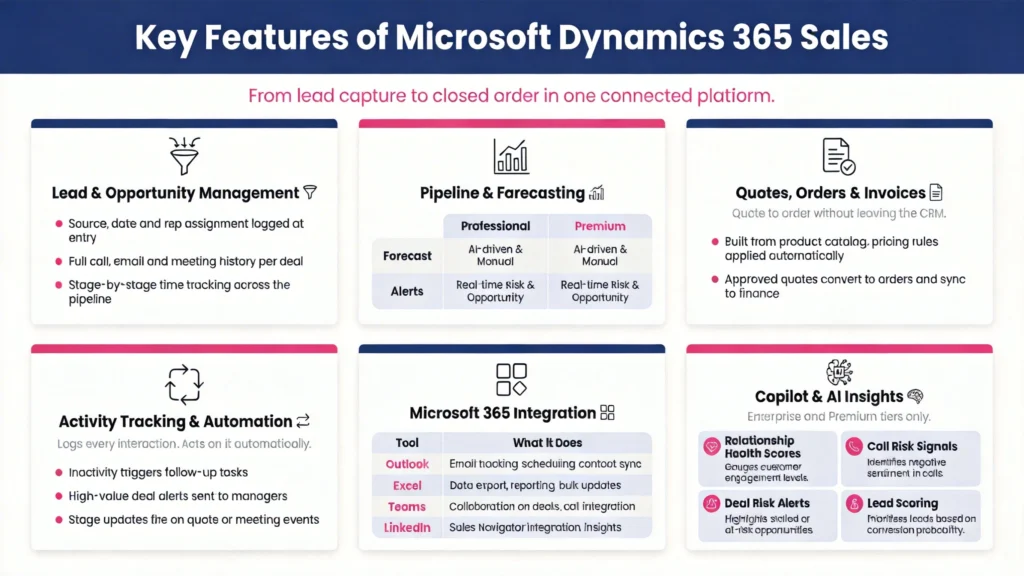
1. Lead & Opportunity Management
This is the operational core of Dynamics 365 Sales, and where most teams see the earliest return.
Every lead entering the system is scored and routed based on rules your team defines. Nothing sits in a queue waiting for manual assignment. Where it changes rep behavior is at the opportunity level, every deal carries a complete history that any rep can access instantly:
- Lead source, entry date, and assigned rep
- All calls, emails, and meetings logged chronologically
- Documents and proposals attached to the deal record
- Stage history showing exactly how long a deal sat at each step
For sales managers, pipeline reviews stop being status update sessions and start being actual strategy conversations, because the data is already current before anyone walks into the room.
2. Sales Pipeline Tracking & Predictive Forecasting
Most CRM forecasts are just rep opinions formatted as numbers. Dynamics 365 Sales changes that at two levels:
| Professional Tier | Premium Tier | |
|---|---|---|
| Pipeline View | Live deal values, stages and close probabilities | Live deal values plus AI deal signals |
| Forecasting | Manual rep commit | AI generated projection from win/loss history |
| Alerts | Stage movement notifications | Predictive risk flags before deals go cold |
| Best For | Teams needing real-time pipeline visibility | Revenue ops teams planning around reliable numbers |
3. Quotes, Orders & Invoices
The gap between a verbal yes and a signed order is where deals stall. Here is how Dynamics 365 Sales closes it:
- Reps build quotes inside the CRM using a configured product catalog, no spreadsheet, no external tool
- Pricing rules, volume tiers, and regional variations are applied automatically
- Quotes route for internal approval without leaving the platform
- Accepted quotes convert to orders and flow downstream to finance or ERP automatically
For teams running complex pricing structures, this removes two of the most common margin erosion points, quoting errors and deal delays caused by manual document handling.
What Else It Covers
Activity Tracking & Workflow Automation
Every rep interaction, emails, calls, meetings, logs automatically against the relevant contact or opportunity. Workflows then act on that data without manual triggers:
- Follow-up tasks created when a deal hasn’t moved within your configured inactivity window
- Manager alerts fired when a high-value opportunity goes inactive
- Stage updates triggered when a quote is sent or a meeting is booked
Reps stop maintaining the CRM and start selling through it.
Microsoft 365 Integration
Dynamics 365 Sales doesn’t sit next to your Microsoft stack, it runs inside it:
| Tool | What It Does Inside D365 Sales |
|---|---|
| Outlook | Log emails, view account history and update opportunities without switching tabs |
| Excel | Pull live pipeline data directly with no exports and no formatting needed |
| Teams | Surface deal context and account history during live calls |
| LinkedIn Sales Navigator | Capture prospect data and track communications inside the CRM (Premium) |
Copilot & AI Sales Insights
Available on Enterprise and Premium tiers. Rather than a dashboard someone has to remember to check, Copilot surfaces intelligence directly in the rep’s workflow:
- Relationship health scores: flags accounts where engagement is dropping before the rep notices
- Conversation intelligence: analyzes call recordings for deal risk signals and coaching moments
- Deal risk alerts: surfaces which opportunities need manager attention before the quarter closes short
- Lead scoring: ranks inbound leads by likelihood to convert based on historical patterns
How Different Industries Use Microsoft Dynamics 365 CRM for Sales
Healthcare
Healthcare organizations, particularly those managing revenue cycle operations, use Dynamics 365 Sales to bring patient referral pipelines and provider relationship management into a governed, trackable system.
Given the compliance requirements in healthcare, the platform’s audit trail, role-based access, and integration with Microsoft’s security infrastructure make it a natural fit for teams that need CRM functionality without stepping outside their compliance boundaries. CaliberFocus has covered this in depth across Dynamics 365 in healthcare RCM and implementation challenges specific to healthcare environments.
Software & Technology
SaaS and technology companies use Dynamics 365 Sales to manage high-volume inbound pipelines without losing lead quality at scale. Automated lead scoring routes qualified prospects directly to the right reps. Opportunity stages map to product trial milestones, giving both sales and product teams visibility into exactly where buyers drop off in the purchase journey.
Manufacturing
Manufacturers run complex distributor and dealer relationships alongside direct sales channels, and the product catalog and quoting module in Dynamics 365 Sales handles that complexity natively. Volume tiers, regional pricing, and custom configurations are managed inside the platform without external quoting tools or custom development bolted on after the fact.
A real-world look at how Dynamics 365 Sales simplified pricing, distribution and pipeline management for an FMCG enterprise.
Get the Inside view of Case Study
Insurance
Industries like insurance run sales cycles where every customer interaction sits inside a compliance boundary. Microsoft dynamics 365 crm for sales becomes the operational backbone for managing both pipeline progression and regulatory workflows in one place, so agents aren’t toggling between systems to complete a single client interaction.
Professional Services
For consulting and services firms, Dynamics 365 Sales tracks the full relationship lifecycle from initial proposal through project delivery. Integration with Dynamics 365 Project Operations means the sales team and delivery team work from the same account data, eliminating the handoff gap where client context is typically lost between deal close and project kickoff.
Other Industries at a Glance
| Industry | Primary Use Case in Dynamics 365 Sales |
| Retail & Distribution | Manage B2B buyer accounts, track seasonal order cycles, automate reorder follow-ups |
| Financial Services | Track advisor-client relationships, manage product cross-sell pipelines, maintain compliance-ready interaction logs |
| Real Estate | Manage property inquiries, track buyer and tenant pipelines, automate follow-up sequences across long decision cycles |
| Logistics & Supply Chain | Track contract renewals, manage key account relationships, forecast revenue across service tiers |
| Education & EdTech | Manage institutional sales pipelines, track enrollment funnels, automate outreach to prospective clients |
Benefits of Microsoft Dynamics 365 for Sales Teams
The benefits of Microsoft Dynamics 365 for enterprises run across finance, operations, and customer service, but for sales teams, the impact lands directly in the numbers that get reviewed every quarter.
- Pipeline stages don’t stall silently. Inactivity rules trigger rep tasks and manager alerts the moment a deal stops moving, so a 30-day-old opportunity at proposal stage gets actioned before it becomes a lost deal post-mortem.
- Forecast accuracy improves because AI reads the pipeline, not the rep. Win probability is calculated from historical deal patterns and engagement signals, not from whatever number a rep keys in on a Friday afternoon.
- Reps recover selling hours lost to CRM admin. Emails sync from Outlook, calls log from Teams, and stage changes fire from workflow triggers. Manual data entry becomes the exception, not the daily routine.
- Every rep enters a sales conversation with the full account history. Open cases, past orders, previous objections, and stakeholder interactions are visible before the call starts, not discovered mid-conversation.
- New reps ramp faster because the process is already built into the system. Playbooks, qualification rules, and approval workflows are configured at the platform level, so a rep hired this quarter follows the same motion as someone with three years on the team.
Dynamics 365 Sales Pricing & Licensing
Microsoft structures Dynamics 365 Sales across three license tiers. The right tier depends on team size, how much AI capability your revenue operations need, and whether LinkedIn integration is a priority for prospecting.
- Professional: $65/user/month: Core pipeline management, forecasting, and mobile access. The right starting point for teams that need solid CRM fundamentals before layering in AI.
- Enterprise: $105/user/month: Adds Copilot AI, product hierarchies, and business card scanning. Most mid-market and enterprise sales teams land here and stay here.
- Premium: $150/user/month: Full AI suite including LinkedIn Sales Navigator, relationship analytics, predictive forecasting, and lead scoring. Built for revenue operations teams where data drives every selling decision, not instinct.
Licensing scales with users. Most organizations start at Professional and move up as adoption matures and more advanced use cases come online.
Conclusion: Turning Dynamics 365 Sales Into a Revenue Engine
Microsoft Dynamics 365 for Sales gives sales teams what most CRMs don’t, a connected platform where pipeline data, customer history, forecasting, and automation work together rather than alongside each other. From lead capture to closed order, every step is tracked, governed, and visible to everyone who needs to see it.
But the platform’s full value is only realized when it’s implemented to match how your sales team actually works, not configured to default settings that reps work around rather than with.
At CaliberFocus, we implement Dynamics 365 for Sales and Customer Service with Copilot-driven sales AI and autonomous lead agents that handle 24/7 lead research so your reps stay focused on closing. Our implementation layer in predictive forecasting, smart case management, and omnichannel support, all configured around your sales process, not a generic template lifted from a Microsoft demo environment.
Organizations looking to get this right from the start work with an implementation partner through Microsoft Dynamics 365 Services & Consulting for Enterprises, book a consultation to see exactly how it maps to your sales motion.
Your Sales Process Deserves Better Than Default
Share your sales challenges and we configure Dynamics 365 Sales around them.
Frequently Asked Questions
Not exactly. Microsoft Dynamics CRM was the legacy on-premise product. Dynamics 365 Sales is its cloud-based successor, modular, AI-enhanced, and part of a broader platform that connects sales with other business functions. The CRM functionality is still there but significantly expanded with automation, forecasting, and Copilot AI capabilities.
Professional covers core pipeline management, forecasting, and mobile access at $65/user/month. Enterprise adds Copilot AI, product hierarchies, and relationship intelligence at $105/user/month. Most mid-market teams find Enterprise the right long-term tier once they move past basic pipeline tracking.
Yes, and this is one of its strongest advantages. Reps log emails, view account history, and update opportunities directly from Outlook without switching applications. Team surfaces deal with context during calls, and Excel connects to live pipeline data for reporting. The entire Microsoft 365 stack works as a native extension of the CRM.
A standard deployment with pipeline configuration, Outlook integration, and core automation typically takes 6 to 12 weeks. Connecting to an existing ERP, migrating data from a legacy CRM, or building custom workflows extends that timeline. The biggest factor is how clearly your sales stages and data requirements are defined before implementation begins.
At the base level, reps manually commit forecast figures by opportunity. The Premium tier upgrades this with AI-driven predictive forecasting, using historical win/loss data and active deal signals to generate a revenue projection that doesn’t rely on rep estimates alone, giving sales leadership a more reliable view of the quarter.