




Every Dynamics 365 implementation we walk into tells the same story before we touch a single configuration. The pipeline exists, but stage movement is manual. Leads are assigned, but follow-up depends on whether the rep remembers. Customer Service has tickets open, but the sales team has no visibility into them. Marketing is running campaigns against a segment that the sales team has already flagged as churned.
The data is there. The problem is that it isn’t connected, and it isn’t acting on anything.
This is not a CRM problem in the traditional sense. Most organizations we work with already have a CRM. Some have had Dynamics 365 running for months.
What they don’t have is a system that was configured around how their team actually sells and services customers, so reps work around it instead of through it, managers export pipeline data into spreadsheets to run their own numbers, and the platform becomes an expensive activity log rather than a business engine.
Microsoft Dynamics 365 CRM is built to do far more than log what happened. When implemented correctly, it tells your team what to do next, surfaces the accounts at risk before the customer disengages, and connects every sales motion, service interaction, and marketing touchpoint into a single operational picture. The gap between what most organizations get from Dynamics 365 and what it’s actually capable of delivering isn’t a technology gap. It’s an implementation gap.
That distinction matters, because closing it starts before a single workflow is configured.
Great Customer Relationships Start With the Right CRM Setup
Let’s build Dynamics 365 the way your customers actually experience it.
What Microsoft Dynamics 365 CRM Actually Is
There’s a version of this answer that lists modules and cloud features. That version misses the point.
Microsoft Dynamics 365 for Sales is the sales-facing engine, pipeline, forecasting, quoting, lead management. When organizations evaluate microsoft dynamics crm 365, the first question is usually about the Sales module, pipeline, forecasting, quoting, lead management. But the CRM isn’t just the Sales module. Customer Service, Marketing, and Field Service all run on the same data model. That’s the architectural decision that changes everything: one customer record, shared across every team that touches that customer.
The other distinction that matters, particularly for organizations evaluating Dynamics 365 against standalone CRMs is the ERP connection. Microsoft Dynamics 365 Business Central shares the same data layer as the CRM Microsoft Dynamics 365 platform.A deal closed in Sales reflects immediately in inventory, procurement, and finance. No integration layer. No manual handoff. The customer record that sales owns and the order record that operations fulfills are the same record.
That’s the structural difference. Everything else follows from it.
Core CRM Capabilities That Drive Customer Relationships
Microsoft Dynamics 365 CRM covers the full operational surface of customer relationship management across four primary capability areas.
Contact and Relationship Management
“One record” sounds simple. In Dynamics 365, it means a rep opening an account sees all of this before the conversation starts:
- Full call, email, and meeting history, chronological, searchable
- Open and resolved service cases across every channel
- Purchase history and active contracts
- Stakeholder map, who’s involved, what their role is, when they last engaged
- Past objections and how they were handled
- Communication preferences and response patterns
Not mid-call. Not after a three-tab search. Before the rep types the first word of an email or dials a number. That’s the operational difference.
Sales Pipeline and Predictive Forecasting
The rep still owns the relationship. The system owns the number.
This is precisely what separates microsoft dynamics 365 sales crm from conventional pipeline tools, the forecast isn’t a field the rep fills in.
Win probability in most CRMs is whatever the rep types in. In Dynamics 365 for sales, it’s calculated, pulled from how similar deals moved, where they stalled, and what signals appeared before closed-won versus closed-lost outcomes. The rep doesn’t estimate the forecast. The forecast is already there when the rep opens the deal.
Stage movement triggers automatically. Inactivity fires alerts before a deal goes cold. The manager’s pipeline review stops being a status update meeting and starts being an actual strategy conversation, because the data is current before anyone walks in.
Copilot AI
This is the capability most organizations misconfigure, and the gap shows immediately after go-live.
| What most teams expect | What Copilot actually does |
| A dashboard to check manually | Intelligence that surfaces inside existing workflows |
| Weekly reporting on account health | Real-time alerts when engagement drops on a specific account |
| A tool the manager uses | Recommendations the rep sees inside Outlook and Teams |
| Insights pulled on demand | Signals delivered at the moment they’re actionable |
Copilot doesn’t require a behavior change to use. That’s the point. It works inside the tools reps are already in, not inside a module they have to remember to open.
Omnichannel Customer Service
Most CRM deployments leave a gap right here: the service team operates in a separate system from the sales team. Tickets exist. Account history exists. They just don’t exist in the same place, visible to the same people, at the same time.
Dynamics 365 closes that loop. Every service interaction, phone, email, chat, social, logs against the same customer record the sales team works from. A service agent picking up an inbound call sees what the sales team last discussed, what’s currently open, what was purchased, and what was promised. The customer never explains their own history to someone who should already have it. That experience, feeling known, not processed, is what retention is actually built on.
How Dynamics 365 CRM Enhances Customer Relationships
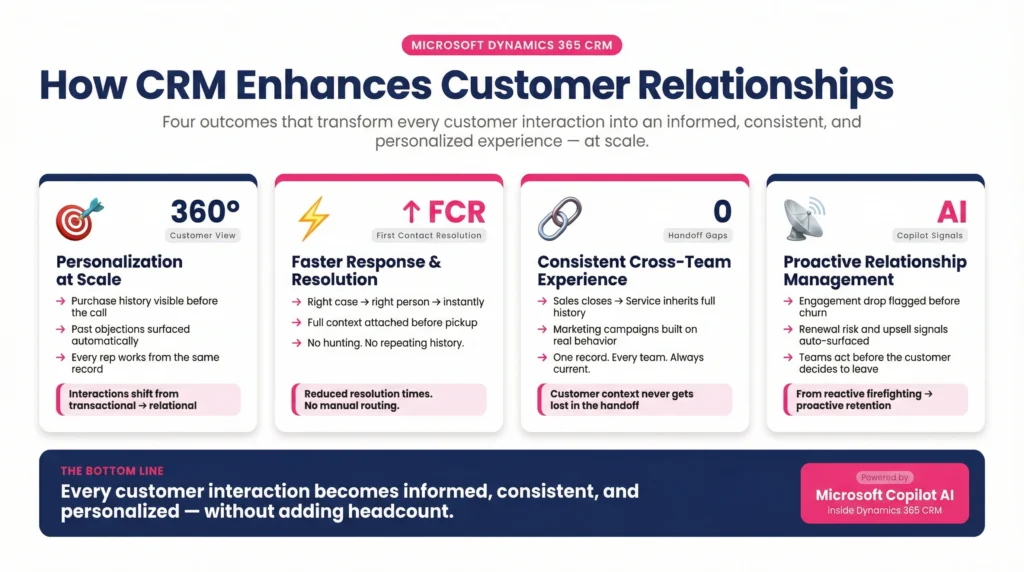
The capabilities above deliver one outcome: every customer interaction becomes informed, consistent, and personalized, at scale.
Personalization at scale is possible because every rep and service agent works from the same 360-degree customer view. Purchase history, past objections, open cases, and communication preferences are visible before the engagement starts. This is what moves customer interactions from transactional to relational.
Faster response and resolution comes from automation that routes the right case to the right person with full context already attached. Service teams aren’t hunting for account history, the system surfaces it automatically. This directly reduces resolution times and increases first-contact resolution rates.
Consistent experience across sales, service, and marketing eliminates the handoff gaps where customer context typically gets lost. When the sales team closes a deal, the service team inherits the full relationship history. When marketing sends a campaign, it’s informed by actual purchase behavior and service interactions, not just demographic segments.
Proactive relationship management is where microsoft dynamics 365 crm separates itself from legacy CRM tools. Copilot surfaces accounts where engagement is dropping before a customer disengages. Predictive analytics identify renewal risk, upsell signals, and churn indicators, so teams move from reactive to proactive without adding headcount.
What Changes When You Add Copilot and Autonomous Agents
Standard Dynamics 365 CRM is powerful. A Copilot-first implementation is a different operating model entirely.
CaliberFocus delivers microsoft dynamics 365 crm services built around Copilot-driven sales AI and autonomous lead agents that handle 24/7 lead research, so reps arrive at every conversation with full prospect context already assembled. Copilot monitors relationship health scores across every account simultaneously, surfacing churn risk signals before they become lost customers. Predictive forecasting operates on live deal signals and historical patterns, giving revenue operations a reliable pipeline view that doesn’t rely on rep estimates.
The result: reps recover selling hours previously consumed by CRM maintenance, and managers stop running status update meetings because the data is already current.
How Dynamics 365 CRM Works Across Industries
Healthcare
Healthcare organizations use microsoft dynamics 365 crm to manage patient referral pipelines, provider relationship management, and care coordination workflows, all inside a HIPAA-compliant data architecture. The compliance requirements make healthcare CRM fundamentally different from other sectors. CaliberFocus has documented the full scope of Dynamics 365 implementation challenges specific to healthcare, from EHR integration through staff adoption in clinical environments.
Insurance
Insurance runs sales cycles where every client interaction sits inside a regulatory boundary. How Microsoft Dynamics CRM transforms insurance operations goes beyond pipeline tracking into underwriting workflow automation, claims management, and broker performance, all inside one governed system.
Manufacturing and Professional Services
Manufacturers use Dynamics 365 CRM to manage complex distributor and dealer relationships with native product catalog and quoting capabilities. Professional services firms track the full relationship lifecycle from initial proposal through project delivery, with sales and delivery teams working from the same account data, eliminating the handoff gap where client context is typically lost after deal close.
Implementation Realities: What to Get Right From the Start
Microsoft Dynamics 365 CRM delivers its full value only when the implementation is built around how your team actually operates, not configured to default settings that reps work around rather than with.
Data migration consistently accounts for 10–20% of total project cost and is among the most underestimated line items in any deployment. A structured view of how to budget for Dynamics 365 implementation covers every cost category, from licensing tiers through post-go-live support, and prevents the budget surprises that derail otherwise sound projects.
User adoption is rarely a training problem. It is a design problem. Systems built around the administrator’s view rather than the daily operator’s reality create resistance that no post-go-live training resolves. The patterns documented in user adoption in complex enterprise environments show exactly where adoption breaks, and what decisions made before go-live prevent it.
Dynamics 365 CRM Across a 200-Dealership Network
A Latin America distributor. Unified dealer relationships, customer data, and after-sales service, one platform.
Frequently Asked Questions
Microsoft Dynamics 365 CRM is a cloud-based, AI-powered customer relationship management platform that manages sales pipelines, customer service, marketing automation, and field service, all from a shared data model that connects natively to ERP and finance. Unlike standalone CRM tools, every module operates from one unified customer record.
CRM Microsoft Dynamics 365 operates on the same data layer as Microsoft’s ERP products, meaning a closed deal instantly reflects in inventory and finance without a custom integration layer. It also runs natively inside Outlook, Teams, and Excel, reducing the context switching that slows adoption in Salesforce environments.
Microsoft Dynamics CRM 365 covers contact and account management, sales pipeline tracking, predictive forecasting, marketing automation, omnichannel customer service, field service management, and Copilot AI across all modules. Organizations can adopt individual modules or deploy the full suite depending on operational scope.
A standard Microsoft Dynamics 365 Sales CRM deployment takes 6–12 weeks for core pipeline configuration, Outlook integration, and automation setup. Data migration, legacy CRM transitions, and custom workflows extend that timeline. For a full breakdown of scope-to-cost variables, see the guide on Dynamics 365 implementation timeline and cost.
Microsoft Dynamics 365 CRM services span the full implementation lifecycle, from pipeline design and workflow automation to data migration, Copilot configuration, role-specific dashboards, and post-go-live support. The scope varies by organization, but the goal is consistent: a system built around how your team operates, not default settings that get worked around.